


Anker eufy
4.515.52K Reviews
App Specs
- Version
- 6.1.10_30612
- Updated On
- License
- Free
- Downloads
- 5,000,000+
- Developer
- Anker
- Categories
- Lifestyle
- Platform
- Android, iOS
Screenshots

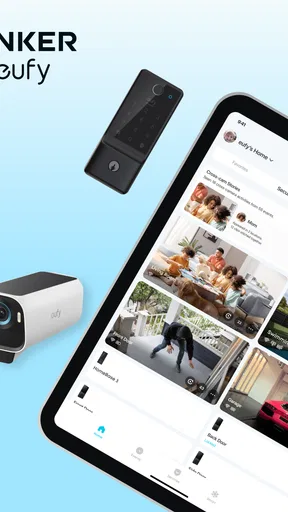
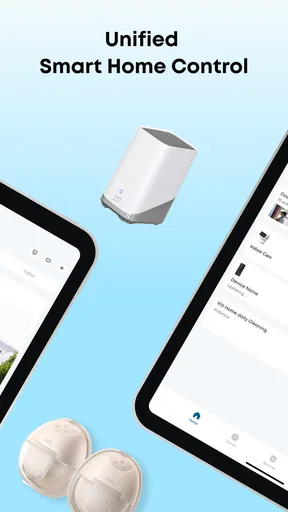
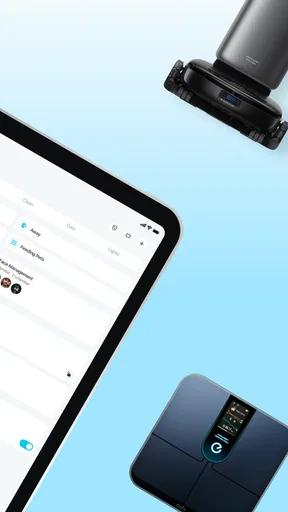
 Analysis by AppCompare
I use eufy Security as the phone-side control point for compatible home-security devices, rather than as a stand-alone camera or alarm. That distinction matters: its value depends on what you own and how you want to check in, receive alerts, and manage those devices. As a lifestyle app from Anker, it makes most sense for people building around eufy equipment; if you want one app to manage unrelated security brands, it may not replace the mix of apps you already use.
A sensible everyday routine starts with a quick check
My preferred baseline is simple: open the app when I want a live look at home, use the relevant device controls, and treat notifications as prompts to check what happened rather than as a complete account of it. That keeps the app useful without turning every movement into a reason to stop what I am doing. The home view is most valuable when the devices I care about are easy to find and I know which alert deserves attention.
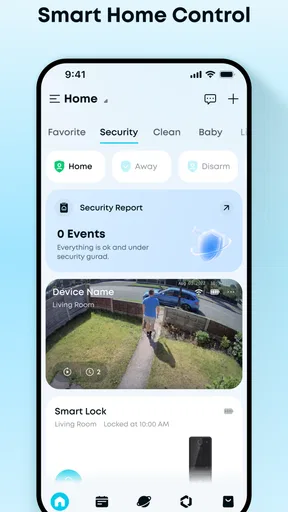
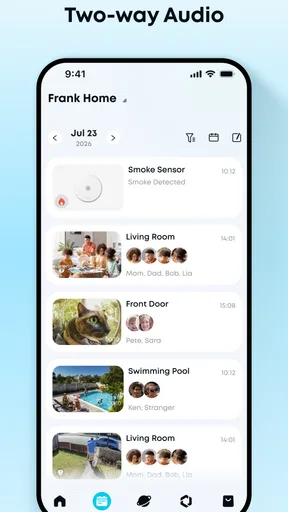
A realistic example is leaving for work and wondering whether someone has come to the door. I can check a compatible camera or doorbell, look at the live view, and use two-way audio if I need to speak to a visitor. That is a practical alternative to opening a separate app for each eufy device, though it still depends on having the relevant hardware installed and connected.
Settings worth checking before relying on alerts
I would spend a few minutes reviewing notification choices early, then revisit them after living with the system. A motion alert that seems useful on day one can become background noise if it fires too often. Where a device offers different alert types, choosing the events that matter to your household is more useful than simply leaving every option enabled. The aim is not to silence the system; it is to make an alert meaningful enough that you will look at it.
Some eufy cameras can distinguish between people and pets, which can reduce irrelevant notices in the right setup. I would still test the result in the places where the camera actually points. A pet moving near a doorway, shadows changing, or activity in a shared space can affect how useful any motion filter feels. Keep expectations tied to the camera and its settings rather than assuming every device will identify every event in the same way.
Shortcuts and habits that make it feel faster
Experienced users get more from a security app by making the routine repeatable. I find it helpful to decide in advance what I will do when an alert arrives: check the event, open the live stream if I need more context, and use audio only when speaking is appropriate. That small sequence avoids repeatedly hunting through screens while also reducing the temptation to react to every notification as an emergency.
For a household with several compatible devices, grouping attention around the reason for checking is often easier than thinking in terms of hardware. If I am checking a delivery, I want the entrance view and a quick way to respond. If I am checking on a room or outdoor area, I want that camera’s view instead. Keeping the devices and their locations clearly named, where the app allows it, can make this habit much smoother than remembering a list of model names.
Worth Reading Before You Choose

EA SPORTS FC Mobile 26 Is a Bigger Football Game, but It Takes Time

Flipboard Shows What News Apps Must Do Beyond the Feed

Switching to Android Auto Means Rethinking Your Driving Routine

Google Calendar Makes a Crowded Week Easier to Manage

Ludo King Makes the Most of the Minutes Between Plans

Baby Panda World Brings Quick Play to Modern Phones, but Its Game Library Feels Busy
Where the app fits among security alternatives
Compared with opening separate manufacturer apps for each compatible eufy product, a shared control app is more convenient: it gives me one place to check the equipment that belongs to this system. Compared with a broad smart-home dashboard, its appeal is more focused on eufy security devices. That focus can be a benefit if you prefer a dedicated security workflow, but it is a limitation if your cameras, sensors, and doorbell come from several different brands.
I would also separate app convenience from the capabilities of the physical devices. Live viewing, audio, detection choices, storage options, and power behavior depend on the equipment and setup in use. The app is the interface for those functions, not a way to add a camera, extend a battery, or make an incompatible device work. If you are choosing a system from scratch, check that the specific devices you want suit your home before treating the app as the deciding factor.
Setting Up and Getting Started
First things first, downloading the eufy Security app is a breeze. It’s available on both Android and iOS, so no one’s left out here. Once installed, the setup process is pretty straightforward. The app guides you through connecting your eufy devices, and trust me, even if you’re not super tech-savvy, you’ll manage just fine.
When I first fired it up, I appreciated the clean interface. Everything is intuitive, which is a massive plus if you’re like me and want things easy and efficient. Adding devices is as simple as tapping a few buttons, and voilà, you’re connected.
Features That Stand Out
Now, let’s talk about what makes this app tick. The eufy Security app is packed with features that cater to all your security needs. Whether you're using cameras, doorbells, or sensors, you can control everything right from your phone. How cool is that?
One of the standout features for me is the live streaming. You can check in on your home anytime, anywhere. Plus, with two-way audio, you can even talk to whoever’s on the other side. I found this super handy when I needed to talk to the delivery guy without actually opening the door.
Custom Alerts and Notifications
Let’s face it, nobody wants to be bombarded with unnecessary notifications. The app lets you customize alerts so you only get notified about what’s important to you. Whether it’s motion detection or doorbell rings, you can tweak the settings to suit your preferences.
And here’s the kicker: the AI technology in some of their cameras can differentiate between humans and pets. So, if your dog decides to have a little zoomies session in the backyard, you won’t get unnecessary alerts.
Performance and Reliability
In terms of performance, I’ve found the app to be pretty reliable. The video quality is sharp, and there’s minimal lag, which is crucial for security purposes. The app also integrates seamlessly with other smart home devices. I’ve got it hooked up with my Google Assistant, and it works like a charm.
Battery life was another pleasant surprise. Even with frequent use, the power consumption is minimal, which is a huge win in my book. Plus, with options for local storage, you’re not forced into cloud subscriptions unless you want that extra peace of mind.
User Experience
Let’s talk usability. The eufy Security app is user-friendly, and everything is logically laid out. You don’t need to be a tech wizard to navigate through the menus or understand the controls. From adjusting camera angles to setting up automation, it’s all there at your fingertips.
One thing I noticed is that the app gets regular updates, which is always a good sign. The developers are clearly committed to improving the user experience and adding new features.
What to expect from the cost and compatibility
The app itself is free, and its Everyone age rating makes it broadly accessible. The current Android release is 5.8.10_19955 and requires Android 8.0 or later. Optional in-app purchases range from $0.99 to $399.99 per item, so I would check what a purchase relates to before committing; those figures do not mean every user needs to spend money to use the app.
Compatibility is the more important practical question. This is not a universal controller for every camera or alarm system: it is intended for eufy Security equipment. If you already own compatible devices, it can bring their controls together. If your household is invested in another brand, sticking with that brand’s app or choosing a system designed for mixed equipment may be the less frustrating route.
Who will benefit, and who may prefer something else
I would recommend it most readily to someone who already has, or plans to use, multiple compatible eufy security products and wants a familiar phone-based way to check them. It is also a reasonable fit for someone who mainly wants occasional live views and targeted alerts, rather than a complicated control panel. The app’s role is clear: make day-to-day interaction with those devices less scattered.
I would hesitate to recommend it as the main solution for someone who needs a single dashboard for several security brands, or for someone who expects the app alone to provide protection without installing devices and tuning them. It is also worth considering whether frequent alerts will suit your routine. If you know you tend to ignore phone notifications, a system that depends on you reacting to them may not match your needs as well as a different approach.
Useful limits to keep in mind
Remote checking is only reassuring when the connection and device view are working well. A live stream can be affected by the network, and no phone app can make a camera’s angle cover a blind spot. Before relying on a view for a particular doorway or room, check what it actually captures from its installed position. I would rather discover a weak angle during setup than assume the app’s map of devices means every area is visible.
Storage is another choice to make deliberately. Local storage can suit people who prefer keeping recordings within their own setup, while cloud options may appeal to those who want a different way to access footage. The right choice depends on the hardware and the way you want to manage recordings. I would decide based on how often I need to review events, not simply on the assumption that one storage approach is automatically best.
There is also a difference between a notification and a verified event. An alert tells me that a device detected something according to its settings; I still need to view the relevant clip or live feed to understand the context. That is why sensible alert tuning matters more than maximizing the number of notifications. It can help the app feel calmer and make the notices I do receive easier to act on.
A steady verdict for an everyday security routine
eufy Security has a 4.6 average from around 205,000 ratings, with more than 5 million installs. It was released on October 19, 2018, and has around 14,000 reviews. Those figures suggest it has reached a substantial audience, but my recommendation comes down to fit: it is most useful when your home already relies on compatible eufy equipment and you want one place to manage the routine.
My practical advice is to begin with the devices you actually need, set alerts conservatively, and test the camera views and audio in ordinary conditions. Then adjust the routine after a few days instead of trying to perfect every setting at once. That approach makes it easier to tell whether the app is helping you keep an eye on home or simply adding another stream of phone interruptions.
Final Thoughts
If you’re in the market for a comprehensive, easy-to-use security app, I’d say give the eufy Security app a shot. It’s robust, reliable, and fits seamlessly into your smart home ecosystem. Whether it’s keeping an eye on things while you’re away or just feeling more secure in your daily life, this app has got you covered. So, go ahead and give it a whirl—I think you’ll be pleasantly surprised.
Pros
- User-friendly interface for easy navigation.
- High-quality video resolution for clear surveillance.
- Customizable notifications for specific alerts.
- Two-way audio for real-time communication.
- Compatible with multiple eufy devices.
Cons
- Requires strong Wi-Fi for optimal performance.
- Limited free cloud storage options.
- Initial setup can be time-consuming.
- Some features locked behind premium plans.
- Occasional app connectivity issues reported.
FAQs for Anker eufy
What features does the eufy Security app offer?
The eufy Security app provides a variety of features designed to enhance home security. It includes live streaming, motion detection alerts, and video playback. Additionally, it supports two-way audio communication, allowing you to speak directly through your security devices. The app also integrates with smart home systems like Alexa and Google Assistant for seamless control.
Is the eufy Security app compatible with all eufy devices?
The eufy Security app is designed to be compatible with a wide range of eufy security devices, including cameras, doorbells, and alarm systems. However, it is essential to check the specific device compatibility on the eufy website or product manual to ensure full functionality and optimal performance.
How secure is the eufy Security app?
Security is a top priority for the eufy Security app, which employs end-to-end encryption to protect user data. This ensures that video footage and personal information are only accessible to authorized users. Additionally, regular security updates and the option for local storage help maintain privacy and data integrity.
Can I access the eufy Security app remotely?
Yes, the eufy Security app allows remote access, enabling users to monitor their security systems from anywhere. With an internet connection, you can view live feeds, receive alerts, and manage device settings, providing peace of mind while away from home. The app supports both Wi-Fi and mobile data access.
Are there any subscription fees associated with the eufy Security app?
The eufy Security app itself is free to use, and many features are accessible without a subscription. However, there may be optional services, such as cloud storage plans, that require a fee. These plans offer additional storage and backup options, allowing users to choose the best fit for their needs.


